![LOGO-WHITE-1.png]](https://support.radaro.com.au/hs-fs/hubfs/LOGO-WHITE-1.png?width=150&height=50&name=LOGO-WHITE-1.png)
Radaro reporting includes:
-
Completed Job Reports
-
Detailed Job Logs
Completed Job Reports – for each job, successfully completed or failed, a job report will be generated showing all details in relation to the job including the proof of delivery photos and client signature.
Job Reports can be accessed via the Management portal and the Detailed Job log exports.
From the management portal
- In the job pane, filter by Completed or Failed to view jobs (the most recent will display at the top)
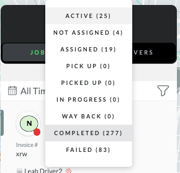
- Use the Search feature to look for a particular job
- From the Reports page you can access job data in numerous ways
- A daily summary of jobs is available – clicking on a specific day will provide further details and a link to the job reports
- You can export a detailed job report that will contain all digital points of the jobs last mile, from the point of creation to completion.
Detailed Job logs
From the Reports page, you can export detailed reports containing all digital points of the jobs last mile, from the point of creation to completion including the link to the job report.
Looking to transform your data for easy analysis into your delivery performance? See the Radaro Intelligence packages to gain deeper insights.
For further information about Reporting, or to learn how Radaro can help streamline your operational workflows, please contact your Radaro Customer Success Manager or email support@radaro.com.au