![LOGO-WHITE-1.png]](https://support.radaro.com.au/hs-fs/hubfs/LOGO-WHITE-1.png?width=150&height=50&name=LOGO-WHITE-1.png)
As detailed on the features page, there are several settings that can be activated to ensure the appropriate POD is captured for your business.
POD settings can also be activated on the Pick up leg of a job, not only the final delivery leg.
Reach out to your Radaro Customer Success Manager to set (or update your POD requirements including:
-
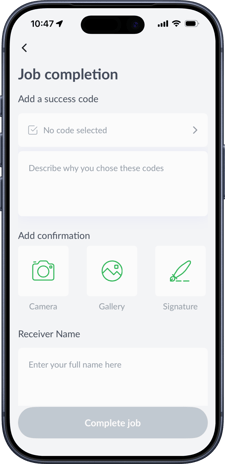
Completion Code Requirements – mandatory or optional
- Photo and Signature requirements:
-
- Either Signature or Photo required
- Photo required / Signature optional
- Signature required/ Photo optional
- Signature & Photo required
- In addition to having simply a single Photo required to complete a job, you can also specify a minimum number of photos to be taken which can greatly assist customer service teams when addressing customer disputes.
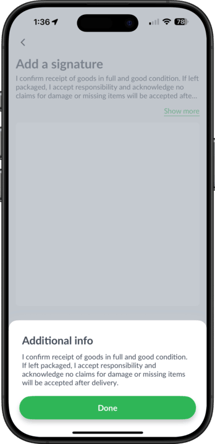
- POD Signature screen wording (the text displayed above the signature box) is customisable up to 300 characters with a read more option where required.
- Receivers Name (dynamic) field: this field can be labelled to suit your operational needs and set as optional or mandatory to ensure you capture the necessary information at the point of pick up or delivery. Most commonly, this field will be used to capture the Receivers Name, however as a free text field (capturing up to 100 characters), it could be utilised to capture other details
such as:
-
- Loading Bay of delivery
- Temperature reading at time of delivery
- Arrival note
- Drop location
-
Reach out to your Radaro Customer Success Manager to review and update your POD requirements as required.