![LOGO-WHITE-1.png]](https://support.radaro.com.au/hs-fs/hubfs/LOGO-WHITE-1.png?width=150&height=50&name=LOGO-WHITE-1.png)
The Radaro Driver App is designed to continue operating even when an internet connection is unavailable. This is made possible through offline caching, which stores essential route and delivery information directly on the driver's device.
Offline caching helps drivers continue completing deliveries in areas with poor or no mobile coverage, ensuring minimal disruption to daily operations.
What Drivers Can Do Offline
While offline, drivers can continue to use the Radaro App as normal.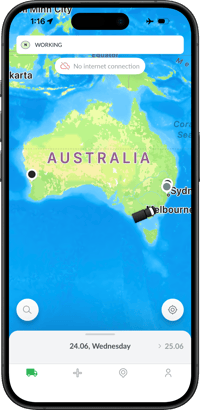
They will be shown as offline in the management portal, and now their device will also display the offline status.
All actions performed while offline are stored on the device and will be synchronised when the device regains internet connection.
What Happens When Connectivity Returns?
As soon as the device regains an internet connection, the Radaro Driver App automatically synchronises all stored information with the Radaro platform and the synchronisation status is shown on the home screen.
Best Practices
To ensure the optimal Radaro App experience:
- Location Settings must be Always On
- Do not use Battery Saving mode
- Activate automatic app updates
- If your device has been offline, do not log out or uninstall the app before synchronisation has occurred.
Please note: as of June 2026, offline notifications and synchronisation alerts are only available on iOS devices. Android updates, coming soon.
If you would like more information regarding Offline Caching, or assistance digitising your last mile operations, contact the Radaro team via support@radaro.com