![LOGO-WHITE-1.png]](https://support.radaro.com.au/hs-fs/hubfs/LOGO-WHITE-1.png?width=150&height=50&name=LOGO-WHITE-1.png)
This feature allows externally pre-sequenced routes to be preserved when jobs are uploaded into Radaro.
To maintain the integrity of the imported sequence, certain editing actions are restricted.
The FAQs below outline what can, and cannot, be modified once an externally sequenced route has been loaded.
How can I identify an External Route Sequence?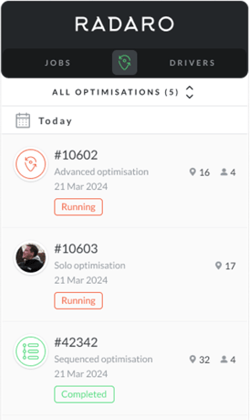
When viewing optimised routes, you can see the various optimisation types indicated by the icons and description as shown in the image:
-
Advanced Optimisation - indicated by the routing pin icon
-
Solo Optimisations - will show the Driver profile image
-
Sequenced Optimisation will show a list icon
Can I edit an Externally Sequenced Route?
No - The route is locked, and all management actions are intentionally restricted to uphold the prescribed job sequence.
Can I delete a job within a Sequenced Route
Yes - An individual job can be deleted, which will remove the stop, but not alter any other part of the route.
Can I edit job details within an Externally Sequenced Route?
Yes - You can update the general details of the job – i.e. name, or add comments.
For further information about External Route Sequencing, or to learn how Radaro can help streamline your operational workflows, please contact your Radaro Customer Success Manager or email support@radaro.com.au